lundi 27 août 2018

How to remap Bixby 2.0 on the Samsung Galaxy Note 9

Samsung Galaxy Note 9 Bixby 2.0

Samsung released Bixby 2.0 with the Samsung Galaxy Note 9. Bixby 2.0 made promises of being way better than Bixby 1.0 which launched last year with the Samsung Galaxy S8 and Galaxy S8+. I have been using the Samsung Galaxy Note 9 for a few days and in my view, Bixby 2.0 is basically the same as 1.0 but missing some features I liked. So like any sane human being, I found a way to remap it. Below are instructions on how to install and use the two best remapping apps for Bixby 2.0 on the Galaxy Note 9.

Remap Bixby 2.0 on the Samsung Galaxy Note 9

Option 1: Button Mapper

Button Mapper: Remap your keys (Free+, Google Play) →

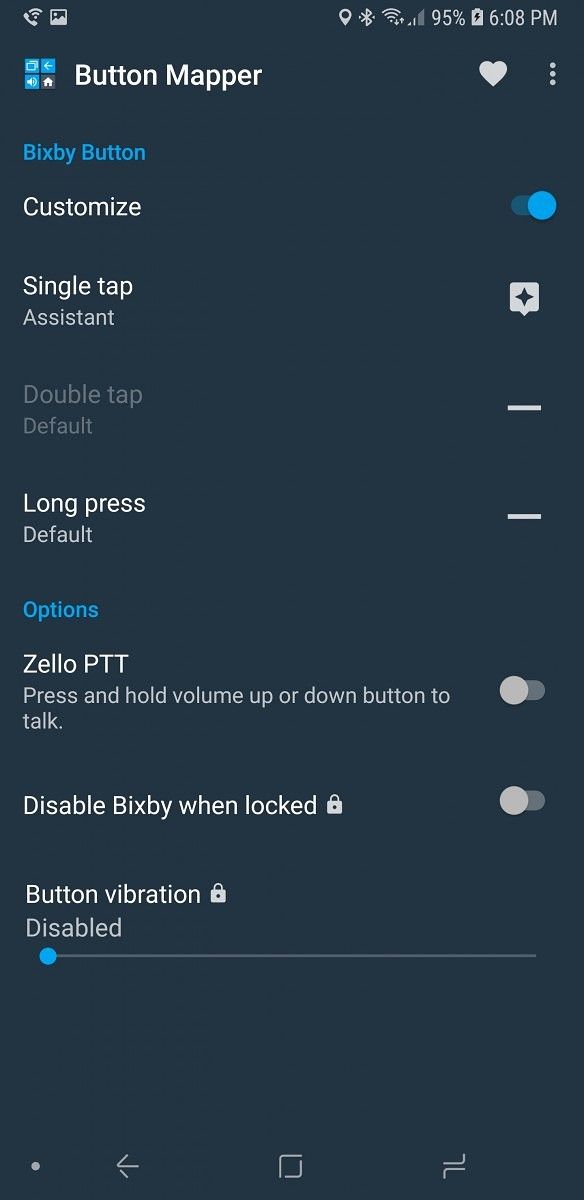
Button Mapper lets you remap any button on your phone, but specifically for our purposes, it lets you remap the Bixby button on the Galaxy Note 9. This app is more reliable than option two, but it does have one downside. You need to run the script every time you reboot your phone. You can follow the tutorial below to set it up.

  1. Install Button Mapper from the Google Play Store.
  2. Set up ADB on your computer. You can follow this guide to get it installed.
  3. Enable ADB by going to Settings > About Phone > Software Information and tap build number 7 times. Once you do this enter your password and go back twice. You can enter the developer options menu now. Just toggle the USB Debugging switch to enable ADB.
  4. Open the Button Mapper app, at the bottom of the window, there will be a popup asking you to enable accessibility services. You then just enable accessibility services for Button Mapper.
  5. Select the Bixby Button option at the top of the app. Then click the customize button. Once you do this you will need to run the following commands:
    adb shell sh /data/data/flar2.homebutton/keyevent.sh
    

    And then

    adb shell sh /data/data/flar2.homebutton/keyevent.sh -d
    
  6. You will need to run this second command every time you reboot your phone. This will also disable Bixby Voice. If you don’t disable Bixby Voice, it will open every time you press the button along with what you have it remapped to. You can re-enable Bixby Voice with the following command:
    adb shell sh /data/data/flar2.homebutton/keyevent.sh -e.
    
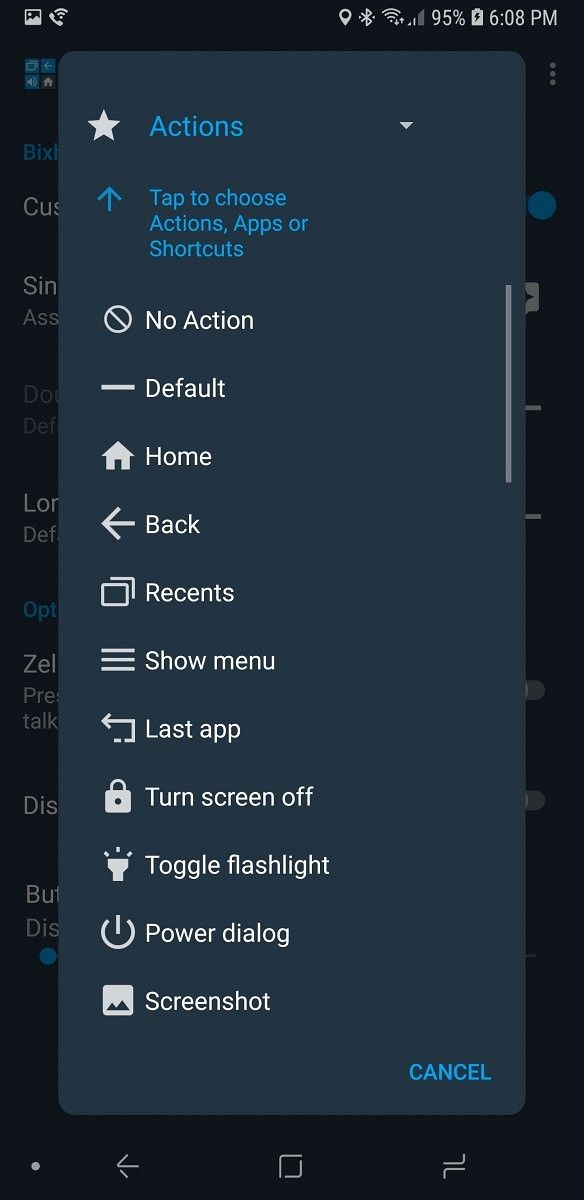
  7. You select whatever option you want to use in the single tap and long press menus. You can set it to do things like open Google Assistant or toggle the flashlight. Remap Bixby 2.0 on the Samsung Galaxy Note 9 Remap Bixby 2.0 on the Samsung Galaxy Note 9

This app seems to be a bit better in use because it disables Bixby Voice and remaps it. The downside is that you will have to run the ADB command every time you reboot your phone. If you don’t want to have to run the command every time you reboot your phone, option 2 will be for you.

Option 2: bxActions

bxActions - Bix Button Remapper (Free+, Google Play) →

bxActions is an app that has been doing Bixby remapping since the Samsung Galaxy S8 and Samsung Galaxy S8+ launched last year. This app is pretty reliable for remapping Bixby on the Samsung Galaxy Note 9, but Bixby Voice is still installed so there could be some compatibility issues with that. The developer is actively developing the app so if you do find any bugs, you should expect them to be fixed.

  1. Join the open beta for bxActions then install the app.
  2. Install ADB on your computer. You can follow this guide to get it installed.
  3. Enable ADB by going to Settings > About Phone > Software Information and tap build number 7 times. Once you do this enter your password and go back twice. You can enter the developer options menu now. Just toggle the USB debugging switch to enable ADB.
  4. Open bxActions and follow the prompts to give it the permissions it needs.
  5. Select the Bix button options and click the red box that says “please unlock permissions using a PC”
  6. Run the two commands:
    adb shell pm grant com.jamworks.bxactions android.permission.WRITE_SECURE_SETTINGS
    adb shell pm grant com.jamworks.bxactions android.permission.READ_LOGS
    
  7. Once you do this close and reopen the app.
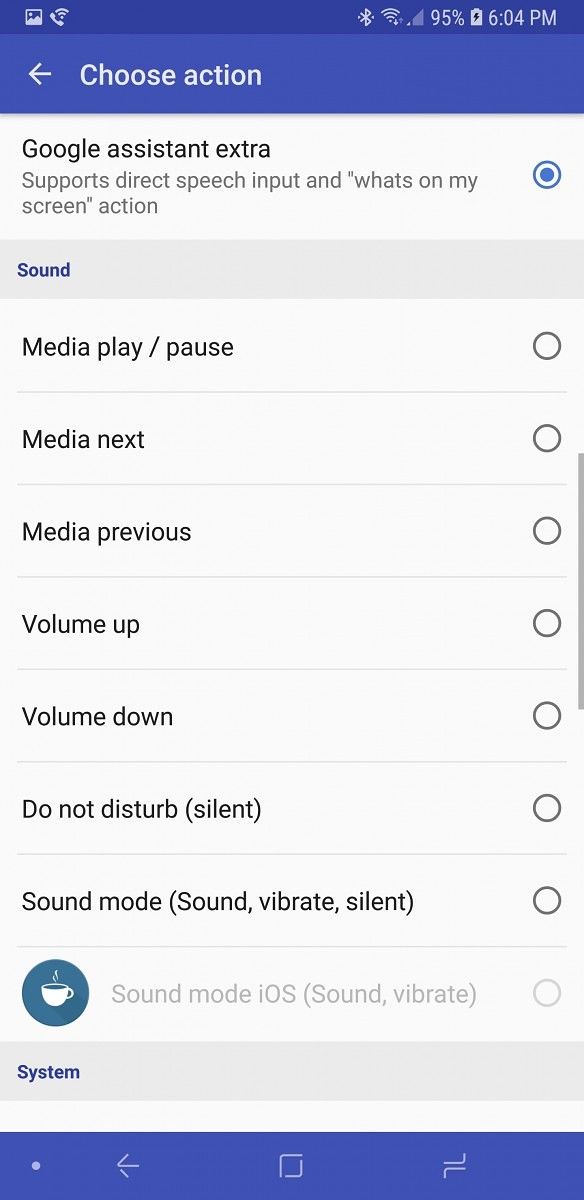
  8. You can now select the option you want to use to remap the Bixby button on the Samsung Galaxy Note 9. This app has actions like Google Assistant and the flashlight toggle as well.
Remap Bixby 2.0 on the Samsung Galaxy Note 9 Remap Bixby 2.0 on the Samsung Galaxy Note 9

This app does work well, but it’s not always as reliable as Button Mapper in my experience. It has the great upside of only needing to be enabled once. You don’t even need to run the adb command, but it does make the app faster and more reliable. This app is by no means bad—I would say it’s probably the best for its function. Just sometimes, I have found it to be unreliable on my Galaxy Note 9.

What remapping Bixby on the Galaxy Note 9 lets you do

Button Mapper lets you remap the Bixby button on the Samsung Galaxy Note 9 to either a long press or a single press. Once you do this you can remap it to one of the actions in the list below. There are also options for Zello, which is a walkie-talkie app. There are Pro options for disabling Bixby when locked and vibration on button press.

  • Default
  • Home
  • Back
  • Recent apps
  • Show menu
  • Last app
  • Turn the screen off
  • Toggle flashlight
  • Power dialog
  • Screenshot
  • Split screen
  • Tasker intent
  • Do not disturb
  • Toggle silent/vibration
  • Mute volume
  • Mute microphone
  • Volume +
  • Volume –
  • Previous track
  • Next track
  • Play/Pause
  • Scroll up
  • Scroll down
  • Copy
  • Paste
  • Kill foreground app
  • Quick settings
  • Notifications
  • Clear notifications
  • Brightness +
  • Brightness –
  • Toggle auto brightness
  • Toggle BlueTooth
  • Toggle WiFi
  • Toggle portrait
  • Change keyboard
  • Open URL
  • Zello PTT (Pro only)
  • Search
  • Assistant
  • Open any application

bxActions has options for both a single press and long press, along with a long press on the lock screen. The long press and long press on lock screen both require the pro mode to be unlocked for $3. You can remap the Bixby button on the Samsung Galaxy Note 9 to the actions below.

  • Disable Bixby
  • Enable Bixby
  • Home
  • Back
  • Phone (dialer)
  • Camera
  • Launch application
  • Launch shortcut action
  • Launch Tasker task (Pro)
  • Google Now
  • Google assistant
  • Google assistant extra (supports direct speech input and “whats on my screen” action
  • Media play/pause
  • Media next
  • Volume up
  • Volume down
  • Do not disturb (silent)
  • Sound mode (Sound, vibrate, silent)
  • Sound mode iOS (Sound, vibrate) (Pro)
  • Task manager
  • Power menu
  • Notification center
  • Settings tray
  • Toggle auto rotation
  • Toggle split screen (Pro)
  • Flashlight (system)
  • Flashlight (extra power)
  • Take screenshot
  • Fullscreen on/off
  • Fullscreen for the current app
  • Cancel all and mark all notifications as read (Pro)
  • Mark as read (Pro)
  • Heads-up notifications on/off (Pro)
  • Take a screenshot with Samsung Capture (Pro and root)

In my opinion, Bixby 2.0 is not that great on the Galaxy Note 9. Luckily for us, we have amazing developers who also agree with this and work on apps to remap it to more useful features, like Google Assistant.


from xda-developers https://ift.tt/2PIF0x0
via IFTTT

Unofficial TWRP and first custom ROM available for the Exynos Samsung Galaxy Note 9

samsung galaxy note 9 wallpaper

The kernel sources were released just a couple of days ago for the Exynos Samsung Galaxy Note 9, the phone which I’ve previously called “slightly better at everything than the Samsung Galaxy Note 8.” We knew the arrival of TWRP and custom ROMs for this particular device would be coming soon, and here are just the first we’ve seen.

XDA Senior Member geiti94 just posted an unofficial TWRP for the Galaxy Note 9. The recovery is only available for the Exynos variants of the Galaxy Note 9. The Samsung Galaxy Note 9 with the Qualcomm Snapdragon 845 system-on-chip are in no way supported. The XDA forum thread claims that recovery has no bugs at all, but make sure to report them if you find any. The device tree and kernel sources are also available in the thread.

There is also a custom ROM available already, courtesy of XDA Recognized Developer/Recognized Contributor dr.ketan. The custom ROM is based on the official Android 8.1 Oreo release with Samsung Experience 9.5, but it has additional features like an optional Magisk root in AROMA installer, Good Lock 2018 with all of its features, SystemUI mods, and more. It’s a stock-based ROM with some added goodies, so it’s perfect for those who want to take advantage of all the features that the Note 9 offers, but with a bit more customizability. Make sure to visit the thread and read it all by yourself. The flashing instructions can be found in the first reply.

If you are lucky enough to already have a Samsung Galaxy Note 9, you can start playing around with it. Just make sure to read every instruction carefully to avoid possibly bricking your brand new device. Also, keep in mind that in most countries rooting your device, or just unlocking the bootloader, voids the warranty. Happy flashing.

Download unofficial TWRP for the Exynos Samsung Galaxy Note 9

Dr.Ketan’s ROM for the Exynos Samsung Galaxy Note 9


from xda-developers https://ift.tt/2NpWyMO
via IFTTT

New LG V40 renders show off the design from all angles

lg v40

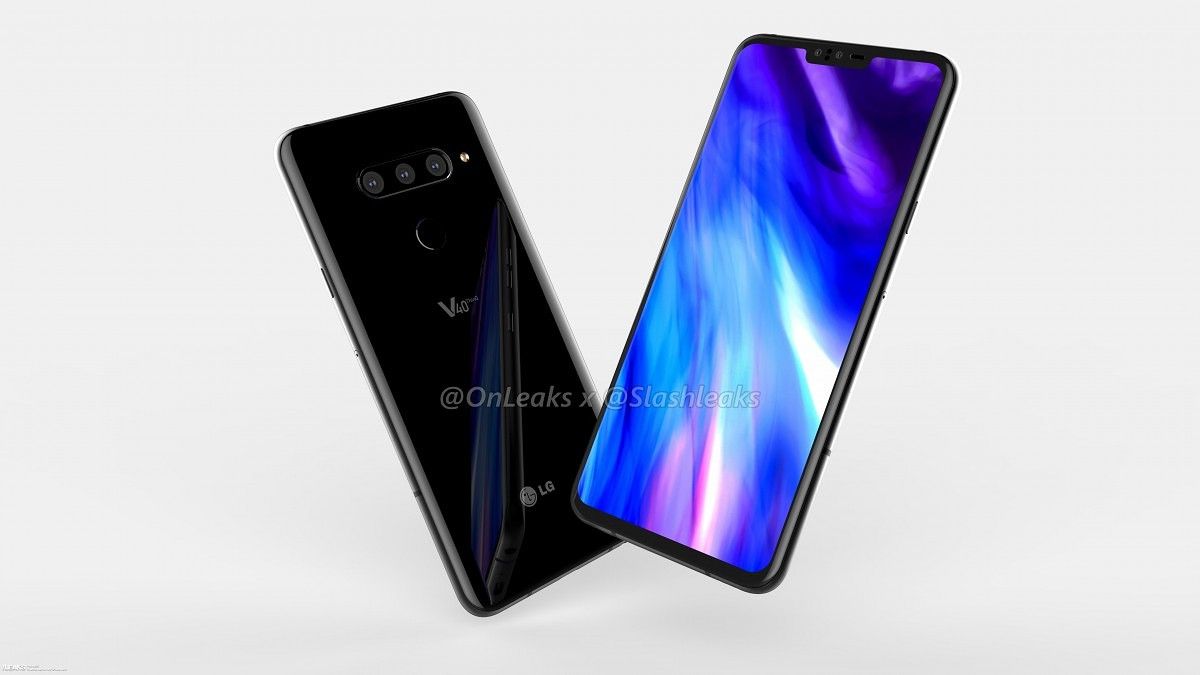
LG is expected to announce the LG V40 soon enough if the huge amount of leaks recently are any indication of anything. Not only have we gotten a sneak peak at what the device will look like, we know a large amount of the specifications it will launch with as well. The LG V40 has been pretty much blown open, and if the leaked front and back renders weren’t enough for you to get a full look at the device, then you’re in luck. Thanks to a leak from Slashleaks in tandem with OnLeaks, we’re getting to see a full 360-degree video showing all angles of the LG V40.  What’s more, a set of 5k renders have also been released as well.

The LG V40

In case you didn’t trust previous renders, this is yet another leak which corroborates the fact that LG’s newest flagship will feature 5 cameras. This isn’t the first time we’ve heard of an OEM doing that, though, as Samsung is set to do the same early next year. That’s three cameras on the back and two on the front. It’s assumed as a result that LG is putting a lot of work into the cameras on the V40. The camera market is getting increasingly competitive as time goes on, so that’s really not a surprise whatsoever. We also see the inclusion of the headphone jack, which is great given the ongoing trend of device manufacturers removing it. A USB-C port is also present, which is to be expected.

In terms of other design choices, it’s noted that the LG V40 will have a 6.3-inch notched display. The notch doesn’t look too intrusive in the video, but it may look worse in person. These are just CAD renders after all. The dimensions of the device come in at 158.8 x 75.8 x 7.8mm (8.2mm camera bump included). It’s a good bit larger than the V30 in nearly every aspect, but that’s not too bad given that it shouldn’t be abnormally large. The V30 came in at 151.7 x 75.4 x 7.4mm, so it’s not as if it’s a whole lot smaller or anything. We’ll have to wait and see how the LG V40 looks in-hand before passing any judgment on whether it’s too large or not.


from xda-developers https://ift.tt/2obOvbj
via IFTTT

Google Play Games tests new leaderboard design & other UI changes

Google Play Games

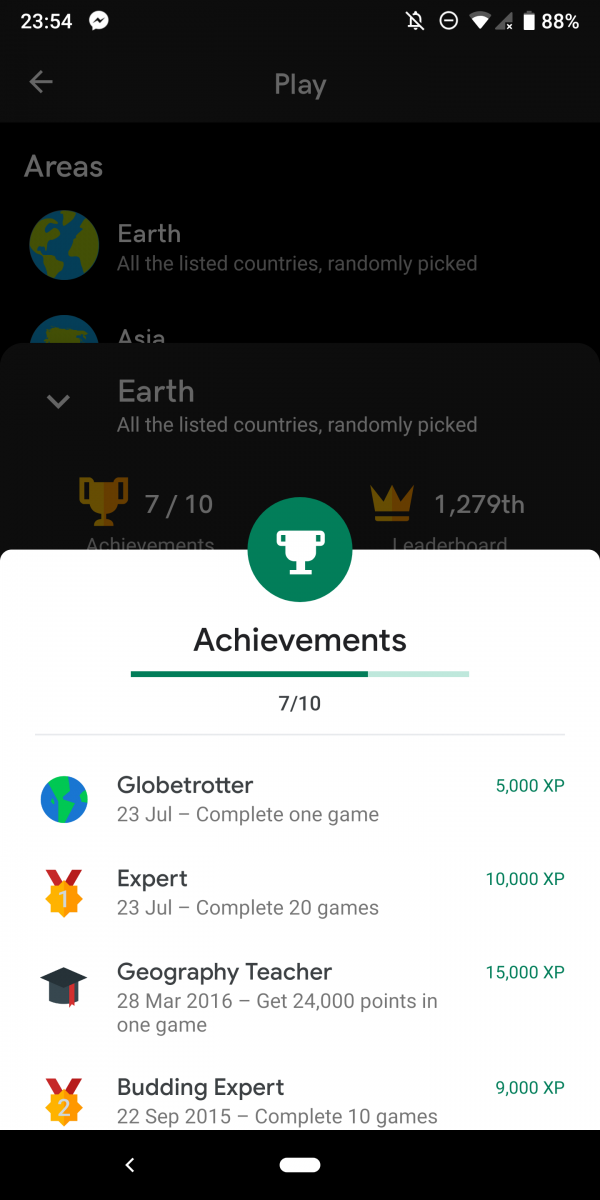
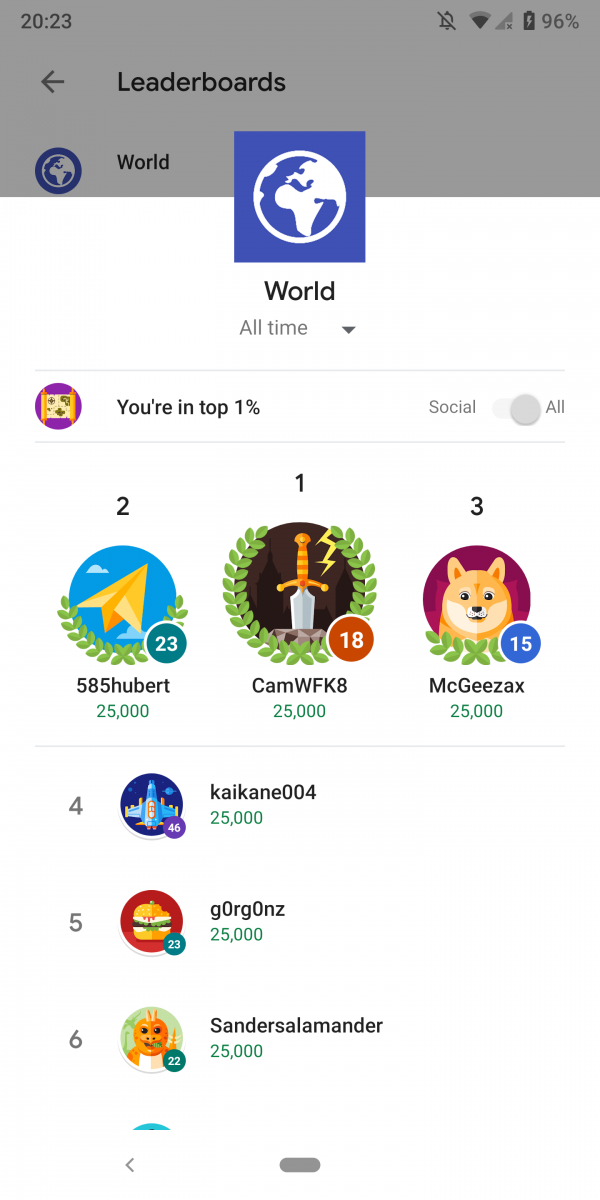
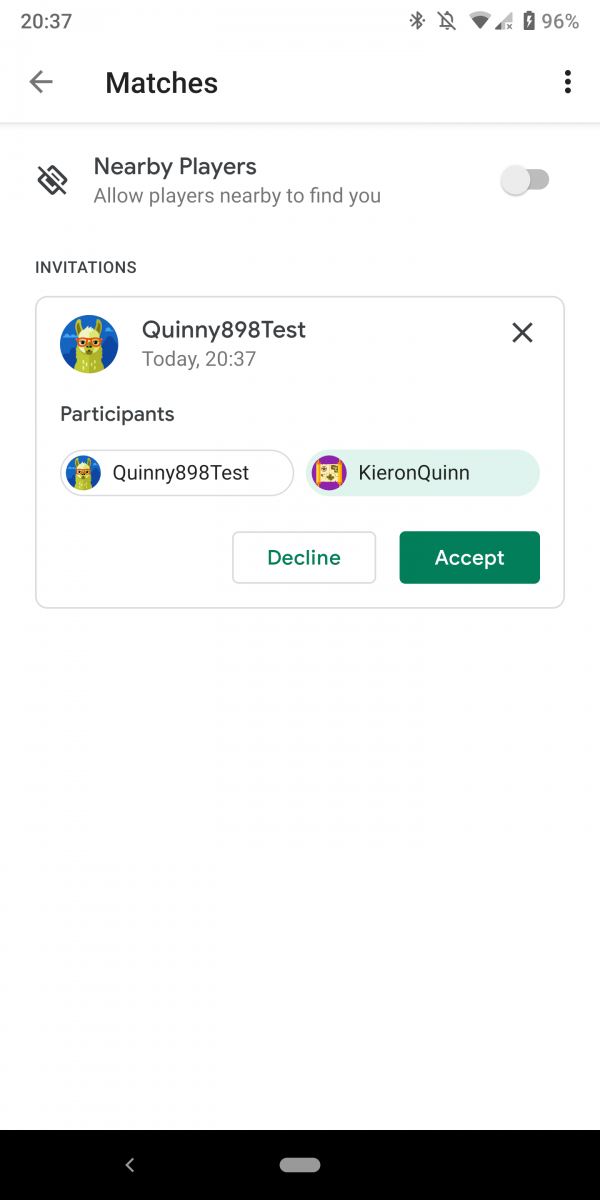
Google is testing a new user interface for the Google Play Games leaderboard and multiplayer window.  The menus are getting the new Material Theme interface that has been rolling out to apps. This adds the new light color design and updated font.

This was enabled by XDA Recognized Developer Quinny898, a.k.a. Kieron Quinn of Mighty Quinn Apps. He was able to enable this in his own game using the newest Google Play Games release. Google Play Games itself has had the new Material Theme update since November of last year. This is the first time we have seen this update in the leaderboard, multiplayer, and achievement user interface. These now all have the Material Theme UI in their respective windows.

The UI is now all white with a green accent color, this is the same as the design of the main app. This also matches the other redesigned parts of the app, which Quinny898 was able to find. This update doesn’t add any new features to Google Play Games or the plugins features in games. It simply brings the app in line with Google’s other redesigned apps.

Google is slowly updating most of their apps with this new interface. Android Messages has this interface. The Google Contacts, Google Phone, Google Fit, Google News, Google OneGoogle Pay, Google Home, and Google Maps apps also have this new interface. They all have been updated since Google I/O 2018 when Google announced this new design.

We are not sure when this update for Google Play Games will be officially available as Quinny898 did have to do a lot of work to get this enabled for his game. It should be soon though as the UI does look very complete.


from xda-developers https://ift.tt/2NpNsj8
via IFTTT

dimanche 26 août 2018

Xiaomi Poco F1, Nokia 6.1 Plus, Samsung Galaxy Note 9/Tab S4, & Xperia XZ2 support ARCore

Google ARCore

ARCore is a platform by Google that is used by developers to add augmented reality features to their applications. Google Camera has used ARCore for AR Stickers, for instance. The list of supported ARCore devices keeps growing. Earlier this month, a bunch of new devices got ARCore support including the Acer Chromebook Tab 10, Huawei Nova 3, Xiaomi Mi 8 SE, Sony Xperia X, and a lot more. Now, 7 more devices like the Xiaomi Poco F1, Nokia 6.1 Plus, Samsung Galaxy Note 9, Samsung Galaxy Tab S4, and the Xperia XZ2 line support Google’s AR platform.

About three days ago, Google updated the official ARCore supported devices list (via AndroidPolice). These newly supported devices are:

  • Xiaomi Poco F1
  • Nokia 6.1 Plus
  • Samsung Galaxy Note 9
  • Samsung Galaxy Tab S4
  • Sony Xperia XZ2
  • Sony Xperia XZ2 Compact
  • Sony Xperia XZ2 Premium

It’s good to see that Google keeps expanding the list of devices of which users can play around with augmented reality apps. Here is the updated list of all devices that currently support ARCore.

ARCore Supported Devices

Device Notes
Asus Zenfone AR
Asus Zenfone ARES
Google Nexus 5X Requires Android 8.0 or later
Google Nexus 6P Requires Android 8.0 or later
Google Pixel
Google Pixel XL
Google Pixel 2
Google Pixel 2 XL
Nokia 6 (2018) Also known as Nokia 6.1
Nokia 6.1 Plus
Nokia 7 Plus
Nokia 8 Requires Android 8.0 or later
Nokia 8 Sirocco
Honor 10
Huawei Nova 3
Huawei Nova 3i
Huawei P20
Huawei P20 Pro
Huawei Porsche Design Mate RS
LG G6 Requires Android 8.0 or later
LG G7 ThinQ
LG V30 Requires Android 8.0 or later
LG V30+ Requires Android 8.0 or later
LG V30+ JoJo Requires Android 8.0 or later
LG V35 ThinQ
Moto G5S Plus
Moto G6
Moto G6 Plus
Moto X4 Requires Android 8.0 or later
Moto Z2 Force
Moto Z3
Moto Z3 Play
OnePlus 3T Requires Android 8.0 or later
OnePlus 5
OnePlus 5T
OnePlus 6
Samsung Galaxy A5 (2017)
Samsung Galaxy A6 (2018)
Samsung Galaxy A7 (2017)
Samsung Galaxy A8 (2018)
Samsung Galaxy A8+ (2018)
Samsung Galaxy Note8
Samsung Galaxy Note 9
Samsung Galaxy S7
Samsung Galaxy S7 edge
Samsung Galaxy S8
Samsung Galaxy S8+
Samsung Galaxy S9
Samsung Galaxy S9+
Samsung Galaxy Tab S4
Sony Xperia XZ Premium Requires Android 8.0 or later
Sony Xperia XZ1 Requires Android 8.0 or later
Sony Xperia XZ1 Compact Requires Android 8.0 or later
Sony Xperia XZ2 Requires Android 8.0 or later with software update after Aug 2018 (security patch level 2018-08-05 or later)
Sony Xperia XZ2 Compact Requires Android 8.0 or later with software update after Aug 2018 (security patch level 2018-08-05 or later)
Sony Xperia XZ2 Premium Requires Android 8.0 or later with software update after Aug 2018 (security patch level 2018-08-05 or later)
Vivo NEX A
Vivo NEX S
Xiaomi Mi 8
Xiaomi Mi 8 SE
Xiaomi Mi Mix 2S
Xiaomi Pocophone F1

You can download ARCore from the link below as well as a sample app to try augmented reality on your device.

ARCore by Google (Free, Google Play) →

Just a Line - Draw Anywhere, with AR (Free, Google Play) →

Check out the official introduction video from Google to understand what the feature looks like in use.


from xda-developers https://ift.tt/2BPb9jt
via IFTTT

Google Camera ports work without root on the Poco F1, Mi 8, and Mix 2S

google camera gcam tool 2.0

Google Camera ports have been very popular on our forums after we first reported on them. Ported Google Camera apps are used for dramatically improving picture quality on many devices thanks to Google’s Portrait Mode and HDR+ technologies. As some of you may already know, Google Camera requires Camera2 API support to work. Most Xiaomi devices lack Camera2 API support out-of-the-box. To activate the API, most Xiaomi users need to at least unlock the bootloader to run a fastboot command if not root their devices to modify build.prop. For the Xiaomi Poco F1, Xiaomi Mi 8 series, and Xiaomi Mi Mix 2S, that’s not necessary.

Xiaomi devices with the Qualcomm Snapdragon 710 or Qualcomm Snapdragon 845 system-on-chips have Camera2 API support enabled by default. This means that, to install Google Camera ports on these devices, you don’t have to unlock the bootloader, root your device, or install any Magisk modules.

Here is the list of Xiaomi devices that should support Google Camera ports without needing to unlock the device’s bootloader:

  • Xiaomi Mi Mix 2S
  • Xiaomi Mi 8
  • Xiaomi Mi 8 Explorer Edition
  • Xiaomi Mi 8 SE
  • Xiaomi Poco F1 (Xiaomi Pocophone F1)

This is big news for loyal fans of Xiaomi products. Xiaomi devices are a great value, but they often lack decent camera apps. Fortunately, the Google Camera app can make up for that. We’ve shown how these ports can greatly enhance the picture-taking quality on budget Xiaomi devices before. I’m running the port myself on my Google Pixel to unlock more features, and I can’t recommend it enough. Just note that the port isn’t magic and may need to be fine-tuned for your device before it can take better pictures than the stock camera app. For example, we found that the stock OxygenOS camera app on the OnePlus 6 takes better pictures than the Google Camera port. Your mileage may vary, though.

You can find the best port for your device at the link below, or by checking out the forum for your particular device.

Google Camera Port Hub


from xda-developers https://ift.tt/2NpGgna
via IFTTT

Sony’s frustratingly good lineup is held back by nonsensical support, awful pricing, and an outdated release strategy

Sony Xperia XZ2

The Sony Xperia XZ2 might just be my favorite device of 2018. Since my very positive review, my impressions of the device have continued to be fairly positive. It is very snappy, has a great display, camera, battery life, and is continually updated by Sony with security patches within two weeks of Google. That isn’t to say there aren’t a few items that bother me about this phone, and in general, I feel that they are ones Sony really needs to mend if they plan any sort of larger market share than the small sliver they currently have from their flagships to their mid-range devices.


The things I still love

First, let’s get the things I still love about my Sony Xperia XZ2 out of the way. As I mentioned earlier getting continuous and regular software updates from Sony have been a very pleasant experience. Not all is roses though. Sony recently promised an Android Pie update in largely the same time frame as Android Oreo even though the Xperia XZ2 had the—now abandoned—Android P beta running on the phone and the phone does not run Android 8.1 Oreo which are bummers. However, it is a benchmark other larger OEMs should look towards, that despite taking longer for feature roll-outs they can and should maintain continuous security patches. That software is also reliably fast. I have yet to have any slowdowns or performance issues with my software, although XDA Portal Contributor Eric Hulse has other thoughts about the Xperia XZ2 Premium, given that his has had some random reboots and odd crashes. Largely though, it is great software, skinned where needed to give Android some polish, and left alone where it doesn’t need anything.  The same goes for the camera.


I really love this camera, and while I could fight with people night and day about how a good photo is up to the eye of the beholder, others have noted its positive traits, especially low smoothing and high detail retention in most lighting conditions as well as true-to-life colors. Sony touted their Bravia powered display as a major selling point of the device and that holds up as well. Despite having to turn off the HDR up-converting-thing they have for anything but feature films, the display is bright and very colorful and to this day does not have any scratches or abrasions, something I cannot say about the back—more on that later. The front firing speakersa rarity these days—are great to listen to podcasts with and although they do not get loud enough, there is zero distortion and they keep their quality at max volume.

I also still love the feel of the phone. Sony’s 2018 design is polarizing and divisive and has likely turned away many fans and that backlash isn’t without merit. However, once you hold the Sony Xperia XZ2, those issues quickly lose ground. It is nearly perfectly shaped to fit into the palm of your hand nicely, has no aggressive lines, and the frame has a solid texture and feel to it—it is a good phone to hold. It isn’t perfect though, and I think Sony really dropped the ball on the choice of back glass coating. My Sony Xperia XZ2 looks like it has a year of abuse in three short months with scratches—mostly deep ones—marring the back, something I have never had on any other glass backed phone. This is mainly due to whatever coating they use but is also made worse by the fact that the device comes to a flat-ish point down the back where it rests on and cradles. It sucks and I wish I could have this in-hand feel without this fairly major downside, but you have trade-offs I guess. Finally, there is the battery life. It has been consistently reliable over the past nearly 4 months of ownership with the phone never dying on me unexpectedly or making me worry about if it was going to make it the whole day. The only time I have had to charge it late in the day was when my wireless charger died without me realizing it, and I went to work without looking at my battery only to find I had about 40% remaining. It is not something I even regularly look at or care about, the Sony Xperia XZ2 is how all phone batteries should be.


And the things I don’t…

I could go on and on about the things I like about the phone, and for more detailed information check out my review. Now though, it is time to turn our attention to the things I think are holding Sony back, not just with the Xperia XZ2 but in the entirety of the market, especially at the premium end.

Product line cannibalization and a 6-month upgrade cycle

When people hear of Sony supporting the Xperia XZ2, Xperia XZ1, and Xperia XZ with Android Pie it sounds like a great thing, and it is, but it is a little less impactful when you realize those constitute only 18 months of devices and likely next month when the Sony Xperia XZ3 is announced, we will have 4 Sony flagships in 24 months. Add the Sony Xperia XZ Premium and Xperia XZ2 Premium devices that, unlike the Samsung Galaxy Note lineup, add very little in actual value and are very close to their mainstream brethren. We thus could have 6 flagship devices in 24-months. To make the situation even worse, the Xperia XZ2 Premium was announced before the Xperia XZ2’s release, and within 60 days of the rumored Xperia XZ3 announcement.

It is hard to recommend a Sony phone to friends or others I speak with because there is quite literally always a new model right around the corner that will replace their current device. Sony has to stop this behavior because it only serves to totally cannibalize their resale values, causing even remotely savvy buyers to go second-hand and save up to $300 in two months, and it makes it very confusing about what Xperia device is currently the best to buy. Android phones already have a massive value problem 6 and 12 months out from release, but few outside of brands that are dying do worse than Sony. It goes without saying that you should not be buying a phone for its resale value, but when you lose hundreds the moment you “drive it off the lot” you have the Chrysler problem, and no one wants the Chrysler problem.

Software bugs and annoyances

My second major issue with Xperia devices are the software bugs. Now, I mentioned earlier that the software is quite stable and very snappy, but there are things that crop up that are annoying. Some popular ones are the camera crashing on launch, and while my device seems to have that fixed in recent updates, it still took a few months to do so. The phone also has the odd tendency to lose Smart Lock in the settings menu—just gone for no reason. This is also an issue that plagued Essential and Motorola, so it is likely more of a stock Android issue but none of my Google Pixels, OnePlus devices, or Samsung devices have ever had this issue, so it can be fixed.

Sony needs radio help, bad

Finally, we come to my biggest gripe about the Xperia XZ2 and the one that keeps me taking my SIM card out of it just to put it back in a few hours later—rebooting each time, thanks Sony—and that is the overall cellular, Wi-Fi situation. Again, I think this is a problem that OEMs with significantly fewer devices on the market have to deal with on live software, but it kills the experience. First off my Wi-Fi will just randomly stop working properly with a single access point. It is typically the same access points, and when it occurs there are low signal issues to contend with but it will cause the Wi-Fi to go into a loop of connecting, getting the IP address, disconnecting, and reconnecting over and over, all while another device sits right next to it perfectly fine.

The cellular situation in the U.S. is no better. I use the phone on T-Mobile, and while I have given up on ever getting VoLTE or WiFi Calling, the least I could ask for is reliable cellular, but that seems to be hit or miss too. Now, this does not seem to be an Essential PH-1 issue where cellular reception is just bad, this is purely software driven where it’ll cling onto a Wi-Fi network far outside the possible range of that device before connecting to cellular, even with all the settings toggled. It will also poorly toggle between LTE and HSPA+—in my area, it should never hit H+—and get stuck on the slower speed until I toggle cellular data and then it immediately connects to full speed LTE.

Text messages also get stuck in this situation, and just today I had to reset my APN settings after a “configuration service download” failed to apply and left me with receiving but not sending messages for a few hours until I reset the APN and rebooted. These are issues that I do not face with my Google Pixel, my BlackBerry Key2, any Samsung device, and not even my OnePlus 6 even though this was something I had to sell my OnePlus 3 for. It is fixable, but Sony does not seem interested enough to bother doing anything about it, especially here in the U.S. where I didn’t import my phone. I bought a U.S. device from a local Best Buy that should work a lot better than it does on my network, the only network it is somewhat compatible with.


Sony has been known for this behavior, making even simple things so frustrating by poor support it causes people to simply give up. I bought my Sony Xperia XZ2 open-box from Best Buy two weeks after I returned it for over $275 off the initial price I originally paid. It’s a long story. You can shop on B&H Photo and Best Buy for open-box or Swappa for used models and save between $200 and $400 on mint-condition models despite being only a few months old. Although they have a small market share, they have a lot of returns and end up being phones that regular people cannot use as their daily driver and it tanks their value. This makes for a sad situation because behind these totally fixable issues is a really great phone. In the end, I cannot blame them giving up either, but that does not stop me from putting my SIM card in this phone nearly every day because it is a great phone if you can just get past the ‘Sony Tax’. This isn’t just applicable to the Xperia XZ line of flagships either. Many of these same issues go down the line to the successful and well-received Xperia XA2 series of devices that sit in the upper mid-range of the market, despite being more suited to solid mid-rangers.

But now, mint Sony Xperia XZ2’s are going for $400—half their price just 3 months ago—and at that price, it is hard to find anything comparable and is absolutely something I would recommend if you can get past the issues I laid out in this article. However, Sony makes no money on the second hand market, and it is hard to see Sony making any money off returns and open-box deals. If Sony wants any opportunities at striking the U.S. and global market while LG and HTC are floundering, they have a few things they need to tend to… otherwise, they will eternally be “other.”


from xda-developers https://ift.tt/2MU1ix8
via IFTTT